
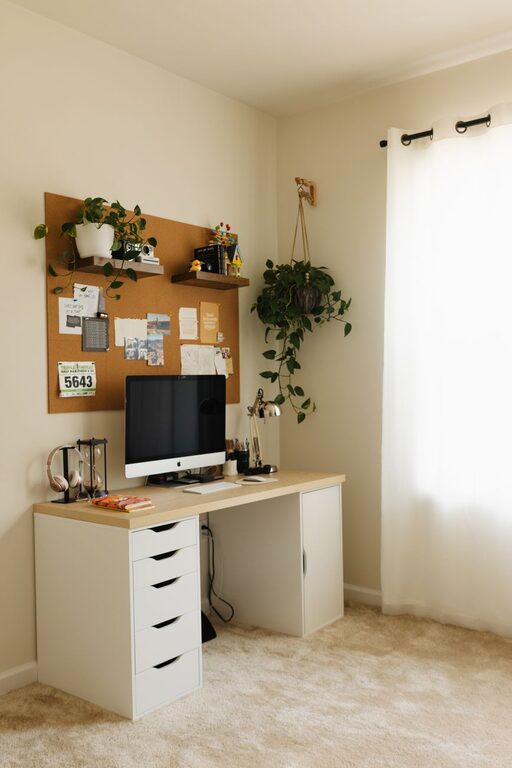
Creating a home workspace that feels cozy yet promotes productivity is essential for anyone working remotely or managing tasks from home. Your environment can greatly influence your focus, energy, and overall satisfaction with your workday. In this post, we’ll explore practical tips to help you design a home office that blends comfort with functionality, so you can enjoy your work while staying productive.
Why a Cozy Workspace Matters
Working from home offers flexibility, but it also brings challenges like distractions and lack of motivation. A cozy workspace—a place that feels inviting and comfortable—can reduce stress and make work more enjoyable. When you feel at ease in your environment, your brain is better prepared to focus and tackle tasks efficiently.
Choosing the Right Location
Find a Dedicated Spot
If possible, pick a specific area in your home for work. This helps create a mental boundary between work and relaxation. Whether it’s a spare room, a corner in your living area, or a nook near a window, having a designated space signals to your brain that it’s time to get into work mode.
Consider Natural Light
Natural light can boost mood and energy, making it easier to stay alert. Position your desk near a window to take advantage of daylight. If natural light is limited, opt for warm, adjustable artificial lighting that won’t strain your eyes.
Ergonomics: Comfort Meets Health
Good ergonomics prevent discomfort and fatigue, enabling longer focus spans.
– Chair: Invest in an ergonomic chair that supports your lower back. Adjustable height and tilt features can provide additional comfort.
– Desk Height: Ensure your desk is at a comfortable height so your forearms rest parallel to the floor.
– Monitor Position: Place your screen at eye level, about an arm’s length away, to reduce neck and eye strain.
– Keyboard and Mouse: Keep these within easy reach to maintain a relaxed posture.
Personalize Your Workspace
Adding personal touches makes your workspace inviting and less sterile.
– Plants: Greenery can improve air quality and reduce stress.
– Artwork or Photos: Choose items that inspire or calm you.
– Cozy Textiles: A soft rug, throw blanket, or cushions can make the space feel warm and inviting.
Organize for Efficiency
Clutter can disrupt focus. Keep your workspace tidy with smart organization.
Essential Organizing Tips
– Use Storage Solutions: Bins, shelves, or drawers help keep documents and supplies in order.
– Cable Management: Use clips or sleeves to prevent tangled cords.
– Minimalism: Keep only the items you need on your desk to reduce distractions.
– Daily Reset: Spend a few minutes at the end of each day tidying your desk.
Optimize for Focus
To maintain productivity, minimize distractions.
– Sound: Consider noise-canceling headphones or ambient music if your environment is noisy.
– Notifications: Turn off non-essential digital notifications during focused work periods.
– Breaks: Use timers or apps to remind yourself to take regular short breaks, which enhance concentration and prevent burnout.
Balance Lighting and Temperature
Your comfort depends on more than furniture and decor.
– Lighting: Blend natural and ambient lighting to avoid harsh glares or shadows.
– Temperature: Maintain a comfortable temperature, around 68-72°F, to stay alert but relaxed.
Technology Setup
Reliable technology supports smooth workdays.
– Internet Connection: A strong, stable connection reduces frustration.
– Peripherals: Use quality keyboards, mice, and headsets to improve comfort.
– Backup Options: Keep chargers and external drives handy for emergencies.
Create a Routine
A cozy and productive workspace is enhanced by a good daily routine.
– Start each day by setting clear goals.
– Schedule work hours and breaks.
– Close the workspace when the workday ends to maintain work-life balance.
—
By thoughtfully designing your home workspace with comfort and efficiency in mind, you create a setting that not only supports your productivity but also your well-being. Experiment with these tips to find the right balance that works for you. A cozy workspace doesn’t just make work easier—it makes it something to look forward to.
About the Author